
Blogger: Making widgets appear only on post pages or homepage or archive pages
I like to keep my home page clean. The homepage Widgets like recent posts, LinkWithin, etc are some unwanted clutter. You can see here that both recent pages widget and body has the same content. Related posts widget is just unwanted.
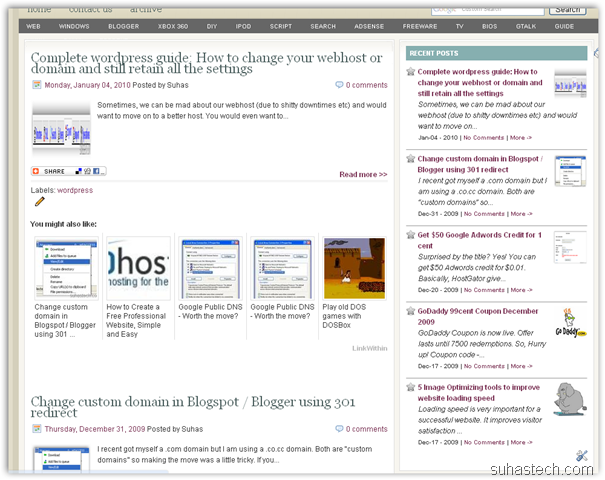
You can just remove this this easily using conditional tags. It’s basically an if:else parser. Sort of like PHP but you can’t use Boolean expression (AND, OR, and stuff)
As of now, Blogger has introduced conditional tags for post pages, index pages, archive pages and static pages. That means, you can program widgets (or codes) in the such a way that they show up ONLY on the index page or ONLY on the archive page or ONLY on the post pages.
So, you ask what else can I do with this option. The uses are literally endless.
- You can set just the archive page to NOFOLLOW so that search engines don’t index archive pages (for better SEO).
- You can also use it show Adsense only on the post pages. Use it just below the title for better Click Through rates.
- Add meta tags to individual pages
- Hide sidebar on static pages
- and lots more..
Now, I’m going to show how to do it onRelated post widget (LinkWithin). You can use it on any other widget. This can be a little tricky for non – programmers. So, please go through this very carefully. If you still can’t get the hang of it. Please comment.
1) First, you need to know the widget ID of your widget. To find it just Go to Blogger Dashboard –> Layout –> Page element. Click on Edit.

2) You can find the Widget ID here. (Mine is HTML9)
3) Now, Go to Blogger Dashboard –> Layout –> Edit HTML
4) Check “Expand Widget Templates”.
5) Find (Ctrl + F) your Widget ID (Eg: HTML9)
6) Add this just after the b:includable tag (normally )
If you want to show the widget only on the blog post pages:
<b:if cond='data:blog.pageType == "item"'>
If you want to show the widget only on the index page or homepage:
<b:if cond='data:blog.url == data:blog.homepageUrl'>
If you want to show the widget only on the archive pages:
<b:if cond='data:blog.pageType == "archive"'>
If you want to show the widget only on the a certain url:
<b:if cond='data:blog.pageType == "YOURURL"'>
If you want to show the widget only on the new static pages (about me, contact etc):
<b:if cond='data:blog.pageType == "static_page"'>
7) Now, add
</b:if>
before the
</includable>
tag.
Finally, you should have something like this:
8 ) Click on Save Template and it’d done.
Marina pointed out that, if you want to hide a widget in a particular page, you can use “!=” instead of “==”
Apparently “==” means include and “!=” means don’t include.
Troubleshooting:
AbdulGafoor described a problem. Sometimes, if you define CSS rules for your widgets and use this hack to hide a particular widget. You’ll find an empty space, that’s it. To fix it, you can add this code between the conditional tags.
#WidgetID1{display:none;}
Add the code before </head> tag just after ‘]]>’

these tags are very useful, thanks very much!
This looks like it could be the answer to one of my long-standing problems, of removing clutter.
I prefer a single column layout, but I want my blog readers to have access to my Archives, Recent Posts, Profile, etc.
What I have done is to create pages using the new Blogger Pages facility, which I have labelled:
Profile
Recent Posts
Archives
Twitter
These are now arranged in a tab form just underneath my header.
What I would like to happen is this:
I create a Recent Posts widget, but I want it NOT to appear on my main blog page, ONLY when a reader clicks the Recent Posts static page link.
I can't pretend I fully understand the conditional statements above, or even which one I should use.
If you could let me know which one is the one to use, (if indeed it can do what I want it to do), I would be grateful.
My blog is at:
http://rock-vacirca.blogspot.com/
Rock
I did try the last example you gave, to show on static pages only (I would prefer a particular static page, not all), but the Archive still shows on the blog, and on all static pages too. Here is the modified Archive widget code I used:
……..
Any help appreciated,
Rock
A particular static page? Thats easy.. Don't think of it as a static page, think of it as a normal page URL.
So, if you want to show a widget ONLY on the recent post static page..Use this tag
{b:if cond='data:blog.pageType == "http://rock-vacirca.blogspot.com/p/recent-posts.html"'}
Just replace {} with <>
I think you have already figured that out..
In my opinion, instead of going through this procedure, you can always paste the recent post HTML code in the Recent post static page (I mean the content).
Hope your problem is solved,
Suhas
hi – thanks for these, but i want to add a widget to my static page in a different position. I've hidden the side bar, but want the labels widget to show in the middle / body of the page, whereas it shows on the left column on my posts page. I was hoping I could either adjust the HTML on the static page, or add an include but also tell it to position itself in the middle of the static page template. Any ideas?
Using this code on a variety of my widgets also helped decrease my upload speed since EVERYTHING isn't loaded on all my blog pages.
@Will… you want show the widget in the middle of the body (i mean the blogpost?)?
That’s kinda impossible to implement …
If you want to show to just below the blogspot. You can add another labels widget, drag it to the bottom.. and use the
tag..
That was what you were looking for?
The method described here has a major flaw. If you add conditional tags inside includable tag, it will sure show/hide the contents of the widget. But if the CSS has some generic rules to modify appearance of the widget, it will also apply to the widget of which the contents are hidden, resulting an empty box or whatever the CSS rules are set for.
Though Blogger help say that we can use pageType attribute for widget tags, Blogger has got a bug which strips off pageType attribute every time we save the modified template. So, that’ll not work as well.
Only solution left is to use conditional tags inside Head element. i.e., where all CSS rules are defined. I have done it in http://nasreenanp.blogspot.com. Let me show you the code I included within Head element just after ‘]]>‘. You can figure out the rest.
#Text1{display:none;}
Hi there. Great post, extremely useful.
I just have one problem : for some reason, every bit of b:if code works, except the one for specific urls.
I want to show the blogroll only on one specific page (links) (since I don’t know how to insert a widget directly into a post/page), but it just won’t work for some reason (now it is set as to appear only on static pages and works like a charm).
Any idea why ?
Thanks for your time and help.
@abdul .. awesome idea….Thanks for pointing it out..
IMO, b:if tag is server side. So, if the b:if tag is not satisfied, it will not be loaded into the browser.
But, if you use just the CSS code.. The widget will load up into the browser every time but, will not show up. Hence, increasing the loading time.
So, the solution would be to use this method + Use the conditional tag for the CSS rules. Will update the OP when I get some time.
Off to school now,
Suhas
Hi – I was looking to hide a widget from my static pages…don’t know about code but managed to merge yours with that from another help site to get this:
Apparently “==” means include and “!=” means don’t include. It’s perfect now. Thanks!
@Marina …. Thanks a lot
… I’ll add that to my post, right away!
THANK YOU VERY MUCH! Finally! Yes it works. I finally managed to get rid of the clutter on the post pages. I’ll finally be able to add whatever I want to on the homepage without it ‘cluttering’ the post pages. Now i just have to figure out how to get rid of the sidebar in the post pages as well. Again, thanks a lot:)
I’ll be including a ‘credit’ page after i’m finished. I’ll be sure to include your site amongst a few others that have provided clear and concise aid.
Cheers!
ed
Thank you …