
I recent got myself a .com domain but I am using a .co.cc domain. Both are “custom domains” so making the move was a little tricky. If you just change the domain in the publishing tab, you’ll lose all the traffic from your old domain.
The solution: You can host the old domain on a server and add .htaccess with the 301 redirection code.
You can use a free webhost for this (I recommend 000webhost). It should have a decent uptime and MUST allow editing .htaccess file. If you have a paid webhosting account, that would be great!
Note This .htaccess method of redirection works ONLY on Linux servers having the Apache Mod-Rewrite moduled enabled
Here’s what you do:
Configuring your old website
Assuming you have a web hosting account and your nameservers configured (If not, this tutorial will help you) I’ll continue to tutorial.
1) Open a FTP client like Filezilla
2) Enter your host name (normally ftp.youroldsite.com) and other credentials. Click on connect.
3) Open public_html. You should find a file called .htaccess (Make sure you can open hidden file)
4) Right click on the file and select Edit.
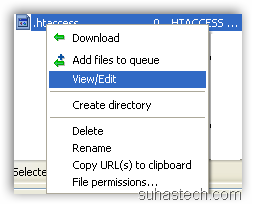 5) Open using Notepad. Paste this code
Options +FollowSymLinks
RewriteEngine on
RewriteRule (.*) http://www.yournewwebsite.com/$1 [R=301,L]
Save the file.
Configuring your new website
1) Goto your Blogger Dashboard –> Settings –> Publishing Tab
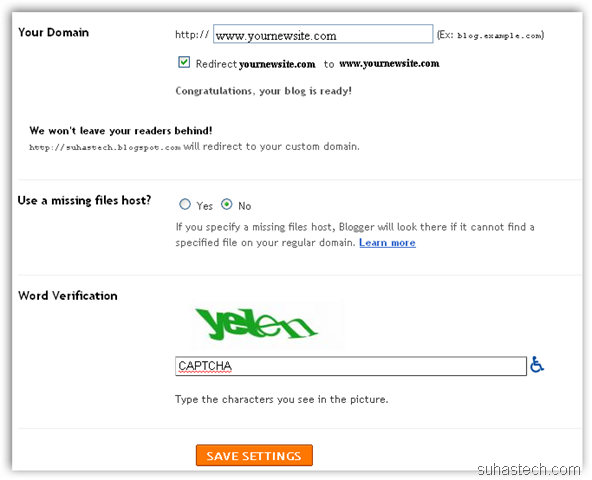
2) Follow this tutorial to configure your new site. This tutorial can be followed for any domain name (.com, .net etc) not neccessarily co.cc.
Phew! I think that’s about it. All your links from your old website will be redirected to the new website.
If you have any doubts, please use the comment form below.
