
Many people would want to connect their Computer to their TVs for better resolution and Quality. TVs can be a better alternative for a Monitor. Here are some of my articles which will help you do so.
For HDTVs (High Definition Television)

Some HDTV have VGA slot which will let you connect your computer easily with a VGA Cable. But many don’t have it, but do have Component Cable.
For that, you can make a VGA and Component Cable. Click Here. (If you aren’t very experienced, i think you can buy one)
For SDTVs (Standard Definition Television)

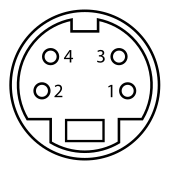
You can use an S-Video port on your Computer. You can connect it to the AV ports (Composite) using a S-Video to Composite Cable. (Again, you can buy it but, its more fun this way)
You’ll need this port.
Comments
Archived WordPress comments (4)
Techack
For HDTV,
Using HDMI is the best option as it gives you the bets possible AV quality
Suhas
@Techack .. Yes, but not all computers have HDMI
Do it yourself – S-Video to RCA (Composite) Cable / Adapter | Suhas Tech
Andrew
nice write up thanks for the quality info!