
First of all I would like to thank all the people involved on Xbox-scene, Llamma and other forums who have made this repair possible.
Disclaimer: Do not use this method if you have the warranty. Use this method as your last resort.
What is RRoD?
Basically, RRoD (Red Ring of Death) is a name given to Microsoft’s 3 Red light error and is a caused by cheap manufacturing.
How do you find out the reason causing RRoD on your Xbox 360?
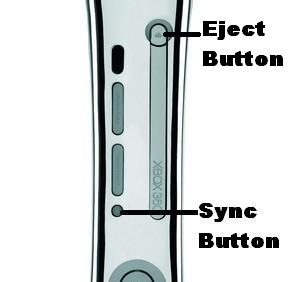
Hold the Sync button and press the Eject button 4 times. You’ll find different number of quadrants of red lights illuminating. Using this you can make a code out of it. Here is the legend.
All four lights illuminate = 0
One Light = 1
Two Lights = 2
Three Lights = 3
Fixes as per the Codes:
1RROD E73; E74;
2RROD 0011; 0012;
3RROD 0002; 0020; 0021; 0022; 0023; 0101; 0102; 0103; 0110; 0203
These errors can be fixed by X-Clamp replacement method. Click here for the tutorial.
3RROD 0001, 0002
After your fix, you can try the 12 Volt cooling mod. This ensure longer life of your fix.
